
In a previous post, we saw how to create and manage a SQLite database using C# with System.Data.SQLite, writing the SQL statements by hand.
In this post, we will build the same application, but using Entity Framework Core with a Code First approach and LINQ.
The idea is simple: instead of writing SQL, we describe our model with C# classes, we let EF Core generate the database schema for us through a migration, and we query the data with LINQ.
We will keep the same domain of the previous post. The SQLite database is named TestDb and it contains a single table called TabUser, so defined:
CREATE TABLE TabUser (
    Id INTEGER PRIMARY KEY AUTOINCREMENT,
    Username TEXT(250),
    Password TEXT(20)
);
The difference is that this time we will not write this SQL but, we will describe the table in C# and EF Core will create it for us.
First of all, we create an empty project and then, we will install the packages via NuGet that we will use in the project:
- Microsoft.AspNetCore.App: for building the minimal API
- Microsoft.EntityFrameworkCore.Sqlite: the EF Core provider for SQLite
- Microsoft.EntityFrameworkCore.Design: design time tools required to create the migrations
- xUnit: for unit testing
- Moq: for mocking dependencies during testing
- Microsoft.Extensions.Configuration: to handle configuration files
Then, we add a configuration file called appsettings.json. This time, instead of a simple database path, we use a standard connection string:
[APPSETTINGS.JSON]
{
  "Logging": {
    "LogLevel": {
      "Default": "Information",
      "Microsoft.AspNetCore": "Warning"
    }
  },
  "AllowedHosts": "*",
  "ConnectionStrings": {
    "DefaultConnection": "Data Source=TestDb.db"
  }
}
Here we use a relative path: EF Core will create the TestDb.db file in the application working directory. This works the same on macOS, Linux and Windows, so we do not depend on a specific operating system.
Now, we define the User entity using a plain C# class (a POCO): no SQL, no attributes.
EF Core will map it to the TabUser table:
[USER.CS]
namespace TestSqLite;

public class User
{
    public int Id { get; set; }
    public string Username { get; set; } = string.Empty;
    public string Password { get; set; } = string.Empty;
}
To describe how the entity maps to the database, we use a configuration class that implements IEntityTypeConfiguration<User>.
This keeps the mapping in one place and mirrors exactly the CREATE TABLE we wrote in the previous post:
[USERCONFIGURATION.CS]
using Microsoft.EntityFrameworkCore;
using Microsoft.EntityFrameworkCore.Metadata.Builders;

namespace TestSqLite;

public class UserConfiguration: IEntityTypeConfiguration<User>
{
    public void Configure(EntityTypeBuilder<User> builder)
    {
        // Map the entity to the TabUser table
        builder.ToTable("TabUser");

        // Primary key with auto increment (INTEGER PRIMARY KEY AUTOINCREMENT)
        builder.HasKey(u => u.Id);
        builder.Property(u => u.Id).ValueGeneratedOnAdd();

        // Username -> TEXT(250)
        builder.Property(u => u.Username).HasMaxLength(250);

        // Password -> TEXT(20)
        builder.Property(u => u.Password).HasMaxLength(20);
    }
}
Next, we define the DbContext, the heart of EF Core: it exposes the tables as DbSet properties and applies the configuration we just created:
[APPDBCONTEXT.CS]
using Microsoft.EntityFrameworkCore;

namespace TestSqLite;

public class AppDbContext(DbContextOptions<AppDbContext> options) : DbContext(options)
{
    // The DbSet represents the TabUser table
    public DbSet<User> Users => Set<User>();

    protected override void OnModelCreating(ModelBuilder modelBuilder)
    {
        // Apply every IEntityTypeConfiguration found in the assembly
        modelBuilder.ApplyConfigurationsFromAssembly(typeof(AppDbContext).Assembly);
    }
}
Now, we keep the same IUserRepository interface as the previous post, so that nothing changes for the consumers of our repository.
The only difference is that GetUserByIdAsync now returns a nullable User?:
[IUSERREPOSITORY.CS]
namespace TestSqLite;

public interface IUserRepository
{
    Task<List<User>> GetAllUsersAsync();
    Task<User?> GetUserByIdAsync(int id);
    Task AddUserAsync(User user);
    Task UpdateUserAsync(User user);
    Task DeleteUserAsync(int id);
    Task EnsureDatabaseCreatedAsync();
}
In the previous post, the UserRepository opened a connection, wrote a SQL string, added parameters and read the results row by row. Now, the repository receives the AppDbContext and works entirely with LINQ. There is no SQL, no reader, no manual parameters. EF Core translates our LINQ into SQL and takes care of parameterization for us:
[USERREPOSITORY.CS]
using Microsoft.EntityFrameworkCore;

namespace TestSqLite;

public class UserRepository(AppDbContext context) : IUserRepository
{
    // Apply pending migrations: creates the database and the TabUser table if needed
    public async Task EnsureDatabaseCreatedAsync()
    {
        try
        {
            await context.Database.MigrateAsync();
        }
        catch (Exception e)
        {
            Console.WriteLine(e);
            throw;
        }
    }

    // LINQ query to read all users
    // AsNoTracking: read-only scenario, we do not need change tracking
    public async Task<List<User>> GetAllUsersAsync()
    {
        try
        {
            return await context.Users
                .AsNoTracking()
                .ToListAsync();
        }
        catch (Exception e)
        {
            Console.WriteLine(e);
            throw;
        }
    }

    // LINQ query to get a single user by id
    public async Task<User?> GetUserByIdAsync(int id)
    {
        try
        {
            return await context.Users
                .AsNoTracking()
                .FirstOrDefaultAsync(u => u.Id == id);
        }
        catch (Exception e)
        {
            Console.WriteLine(e);
            throw;
        }
    }

    // Add a new user: EF Core generates the INSERT statement
    public async Task AddUserAsync(User user)
    {
        try
        {
            await context.Users.AddAsync(user);
            await context.SaveChangesAsync();
        }
        catch (Exception e)
        {
            Console.WriteLine(e);
            throw;
        }
    }

    // Update an existing user: EF Core tracks the changes and generates the UPDATE
    public async Task UpdateUserAsync(User user)
    {
        try
        {
            var existingUser = await context.Users.FindAsync(user.Id);
            if (existingUser is null)
                return;

            existingUser.Username = user.Username;
            existingUser.Password = user.Password;
            await context.SaveChangesAsync();
        }
        catch (Exception e)
        {
            Console.WriteLine(e);
            throw;
        }
    }

    // Delete a user by id: EF Core generates the DELETE
    public async Task DeleteUserAsync(int id)
    {
        try
        {
            var user = await context.Users.FindAsync(id);
            if (user is null)
                return;

            context.Users.Remove(user);
            await context.SaveChangesAsync();
        }
        catch (Exception e)
        {
            Console.WriteLine(e);
            throw;
        }
    }
}
Before creating the migration, we need one more small class: a design-time DbContext factory.
To understand why, we have to distinguish between two different moments. At runtime, our application starts, the DI container reads the connection string from appsettings.json and builds the DbContextOptions for us, thanks to the AddDbContext,AppDbContext>(…) call we will write in Program.cs. But when we run “dotnet ef migrations add”, the dotnet-ef tools need an instance of AppDbContext at design time, outside of the running application. In a Minimal API project (with top-level statements) the tools are not always able to start our host and reuse that DI configuration. When that happens, they try to create the context directly, they cannot find the DbContextOptions, and we get this error:
Unable to create a 'DbContext' of type 'AppDbContext'.
Unable to resolve service for type 'DbContextOptions`1[AppDbContext]'
while attempting to activate 'AppDbContext'.
The solution is to give the tools an explicit recipe to build the context, by implementing IDesignTimeDbContextFactory<AppDbContext>:
[APPDBCONTEXTFACTORY.CS]
using Microsoft.EntityFrameworkCore;
using Microsoft.EntityFrameworkCore.Design;

namespace TestSqLite;

public class AppDbContextFactory : IDesignTimeDbContextFactory<AppDbContext>
{
    public AppDbContext CreateDbContext(string[] args)
    {
        var optionsBuilder = new DbContextOptionsBuilder<AppDbContext>();
        optionsBuilder.UseSqlite("Data Source=TestDb.db");
        return new AppDbContext(optionsBuilder.Options);
    }
}
It is important to understand that this factory does not duplicate our runtime configuration: at runtime the application still uses the AddDbContext registration from Program.cs, while the factory is called only by the command line tools. The only thing shared between the two is the connection string. If we want to keep it perfectly DRY, the factory can read the same string from appsettings.json using a ConfigurationBuilder, but for a design-time helper the literal value is perfectly acceptable.
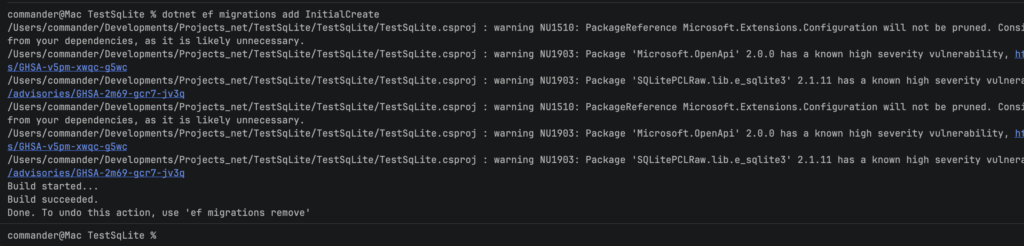
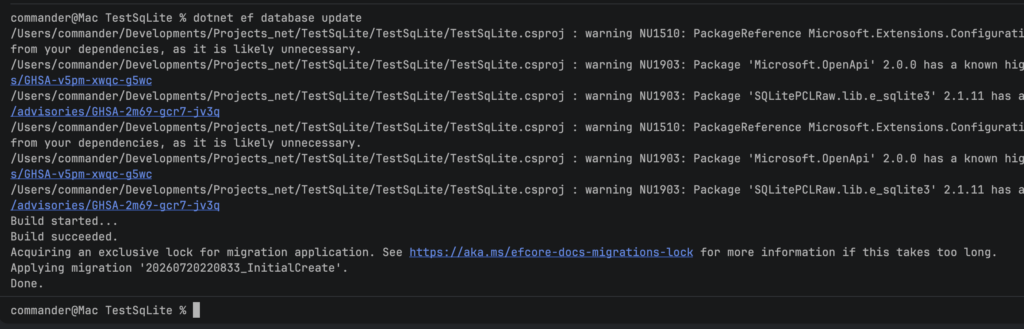
Now we can create the migration. This is what “Code First” is really about: from our C# model, EF Core generates the SQL schema for us.
dotnet tool install --global dotnet-ef
dotnet ef migrations add InitialCreate
dotnet ef database update
Now, in the Program.cs file, we register the DbContext with the SQLite provider and we define the Minimal API. The endpoints are identical to the previous post:
using Microsoft.EntityFrameworkCore;
using TestSqLite;

var builder = WebApplication.CreateBuilder(args);

// Add configuration
builder.Configuration.AddJsonFile("appsettings.json", optional: false, reloadOnChange: true);

// Register the DbContext using the SQLite provider and the connection string
builder.Services.AddDbContext<AppDbContext>(options =>
    options.UseSqlite(builder.Configuration.GetConnectionString("DefaultConnection")));

// Register the repository (Scoped, like the DbContext)
builder.Services.AddScoped<IUserRepository, UserRepository>();

var app = builder.Build();

// Ensure database and tables are created (applies the migrations)
using (var scope = app.Services.CreateScope())
{
    var userRepository = scope.ServiceProvider.GetRequiredService<IUserRepository>();
    await userRepository.EnsureDatabaseCreatedAsync();
}

// Map endpoints
app.MapGet("/users", async (IUserRepository userRepository) =>
{
    // Endpoint to get all users
    return await userRepository.GetAllUsersAsync();
});

app.MapGet("/users/{id}", async (int id, IUserRepository userRepository) =>
{
    // Endpoint to get a user by ID
    return await userRepository.GetUserByIdAsync(id);
});

app.MapPost("/users", async (User user, IUserRepository userRepository) =>
{
    // Endpoint to add a new user
    await userRepository.AddUserAsync(user);
    return Results.Created($"/users/{user.Id}", user);
});

app.MapPut("/users/{id}", async (int id, User user, IUserRepository userRepository) =>
{
    // Endpoint to update an existing user
    user.Id = id;
    await userRepository.UpdateUserAsync(user);
    return Results.NoContent();
});

app.MapDelete("/users/{id}", async (int id, IUserRepository userRepository) =>
{
    // Endpoint to delete a user by ID
    await userRepository.DeleteUserAsync(id);
    return Results.NoContent();
});

app.Run();
The last class that we have to define is the UserRepositoryTests class. Since we mock the IUserRepository interface, the tests remain exactly the same as the previous post: we are testing the contract, not the implementation:
[USERREPOSITORYTESTS.CS]
using Moq;
using Xunit;

namespace TestSqLite;

public class UserRepositoryTests
{
    private readonly Mock<IUserRepository> _mockRepo = new();

    [Fact]
    public async Task GetAllUsersAsync_ShouldReturnListOfUsers()
    {
        // Arrange
        _mockRepo.Setup(repo => repo.GetAllUsersAsync()).ReturnsAsync(new List<User>
        {
            new User { Id = 1, Username = "Alice", Password = "password1" },
            new User { Id = 2, Username = "Bob", Password = "password2" }
        });

        // Act
        var users = await _mockRepo.Object.GetAllUsersAsync();

        // Assert
        Assert.NotNull(users);
        Assert.Equal(2, users.Count);
    }

    [Fact]
    public async Task GetUserByIdAsync_ShouldReturnUser_WhenUserExists()
    {
        // Arrange
        var user = new User { Id = 1, Username = "Alice", Password = "password1" };
        _mockRepo.Setup(repo => repo.GetUserByIdAsync(1)).ReturnsAsync(user);

        // Act
        var result = await _mockRepo.Object.GetUserByIdAsync(1);

        // Assert
        Assert.NotNull(result);
        Assert.Equal("Alice", result.Username);
    }

    [Fact]
    public async Task GetUserByIdAsync_ShouldReturnNull_WhenUserDoesNotExist()
    {
        // Arrange
        _mockRepo.Setup(repo => repo.GetUserByIdAsync(99)).ReturnsAsync((User)null);

        // Act
        var result = await _mockRepo.Object.GetUserByIdAsync(99);

        // Assert
        Assert.Null(result);
    }

    [Fact]
    public async Task AddUserAsync_ShouldAddUser()
    {
        // Arrange
        var user = new User { Username = "Alice", Password = "password1" };
        _mockRepo.Setup(repo => repo.AddUserAsync(user)).Returns(Task.CompletedTask);

        // Act
        await _mockRepo.Object.AddUserAsync(user);

        // Assert
        _mockRepo.Verify(repo => repo.AddUserAsync(user), Times.Once);
    }

    [Fact]
    public async Task UpdateUserAsync_ShouldUpdateUser()
    {
        // Arrange
        var user = new User { Id = 1, Username = "Alice", Password = "password1" };
        _mockRepo.Setup(repo => repo.UpdateUserAsync(user)).Returns(Task.CompletedTask);

        // Act
        await _mockRepo.Object.UpdateUserAsync(user);

        // Assert
        _mockRepo.Verify(repo => repo.UpdateUserAsync(user), Times.Once);
    }

    [Fact]
    public async Task DeleteUserAsync_ShouldDeleteUser()
    {
        // Arrange
        var userId = 1;
        _mockRepo.Setup(repo => repo.DeleteUserAsync(userId)).Returns(Task.CompletedTask);

        // Act
        await _mockRepo.Object.DeleteUserAsync(userId);

        // Assert
        _mockRepo.Verify(repo => repo.DeleteUserAsync(userId), Times.Once);
    }
}
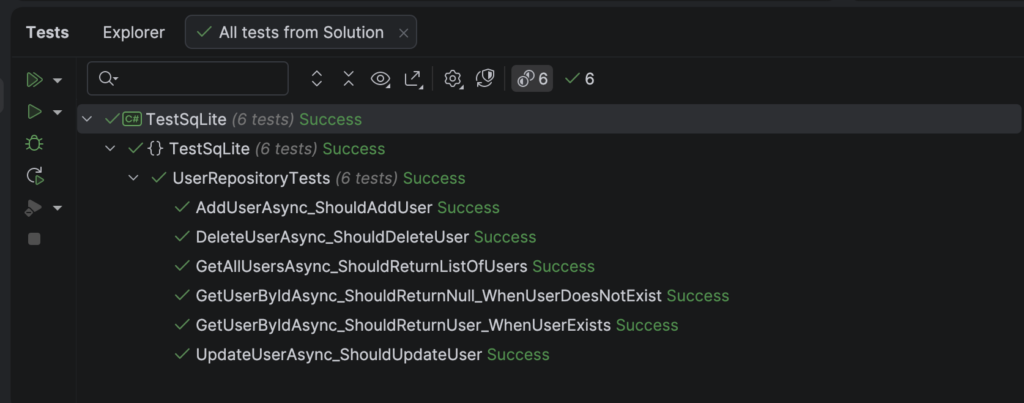
If we run the Unit Tests, this will be the result:
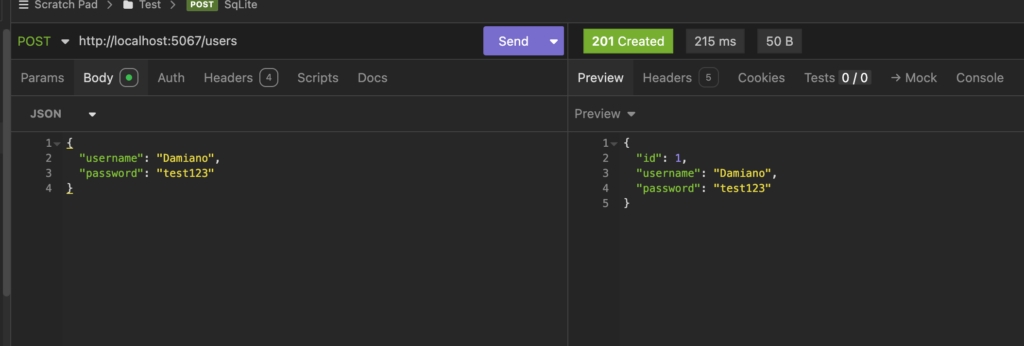
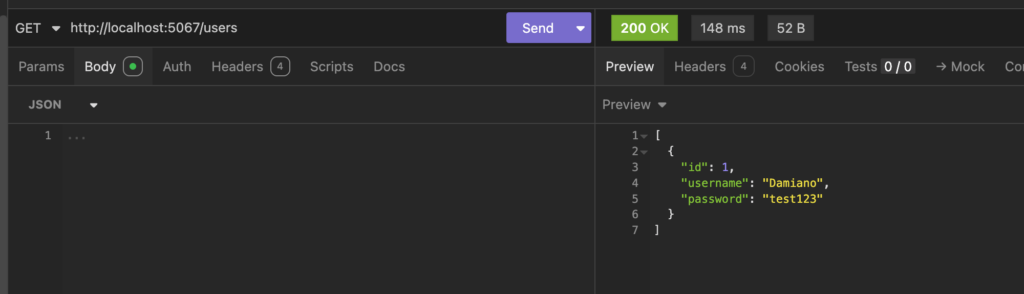
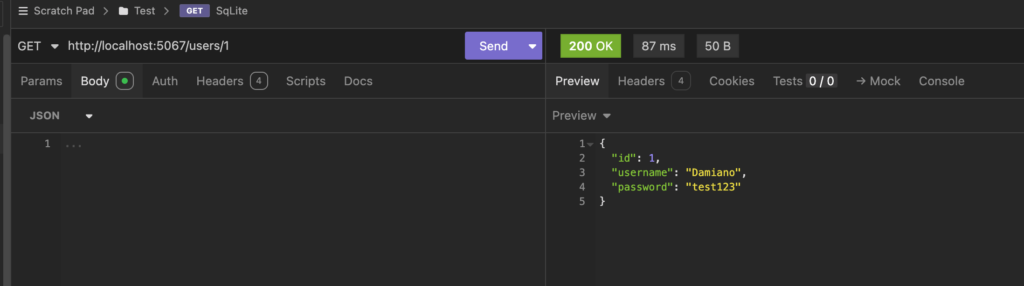
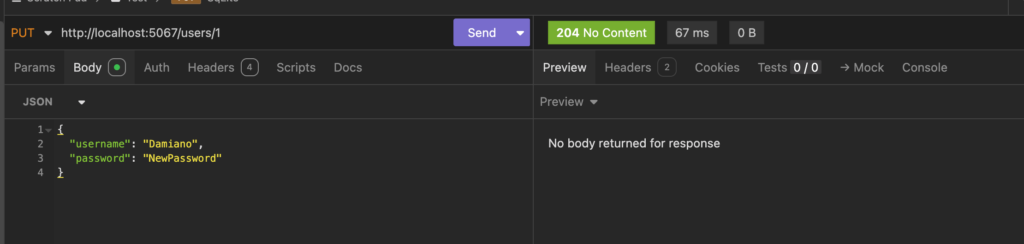
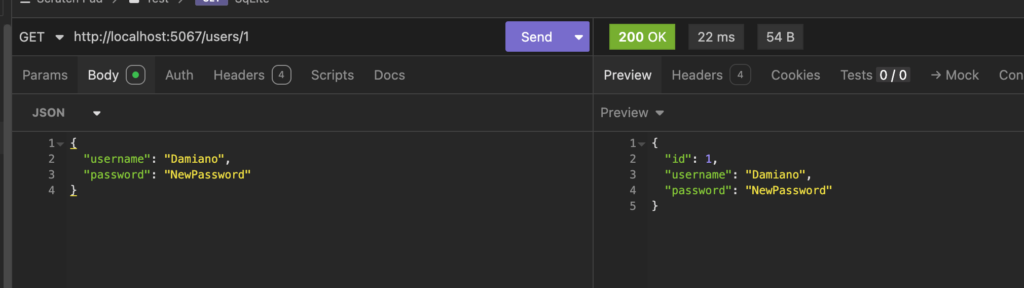
Finally, using an API client as Insomnia, we will check if all CRUD operations work fine:
INSERT:
SELECT:
UPDATE:
DELETE:
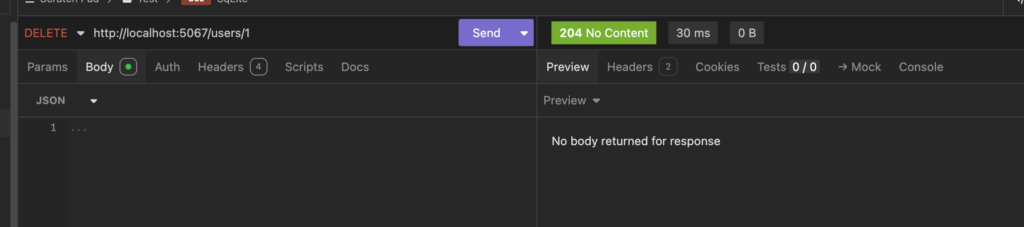
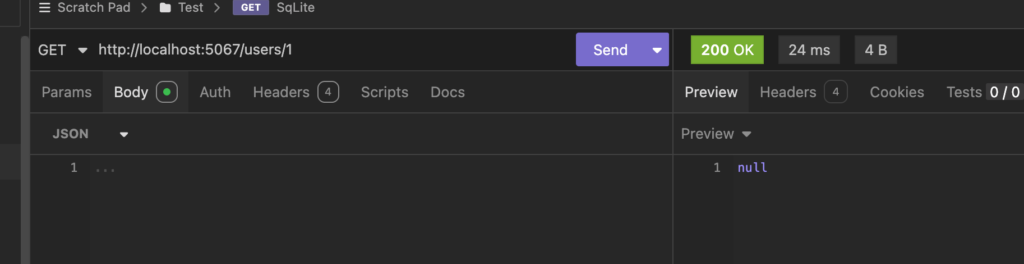

As we can see, the application behaves exactly like the one in the previous post, but the code is now cleaner and safer.
We removed all the hand written SQL, we let EF Core generate and evolve the schema through migrations, and we query our data with LINQ.
The repository is easier to read and, thanks to EF Core, our queries are automatically parameterized, so we do not have to worry about SQL injection.