
In this post, we will see what Mapperly is and why we should consider it instead of AutoMapper, now that AutoMapper is no longer completely free.
But first of all, what is Mapperly?
“Mapperly is a .NET source generator for generating object mapping code. It generates the mapping code at compile time, without using reflection, resulting in mappings that are fast, debuggable, and easy to understand.”
In a nutshell, instead of building the mapping logic at runtime through reflection and expression trees (like AutoMapper does), Mapperly analyzes our classes at compile time and generates plain, readable C# mapping code for us.
We can open the generated file and read it exactly as if we had written it ourselves.
Why We Should Use Mapperly Instead of IMapper.
For years, AutoMapper has been the default choice for object-to-object mapping in .NET projects, and honestly, it has served us well. However, on 16 April 2025, Jimmy Bogard (the creator of AutoMapper) announced that AutoMapper was moving to a commercial license. Small teams and personal projects can still use it for free under the community tier, but organizations over a certain revenue threshold now need to pay for it.
This news pushed a lot of us to look for free and open-source alternatives, and Mapperly quickly became one of the most popular choices. Here are the main reasons we should consider it:
- It’s free and open source. Mapperly is released under the Apache 2.0 license, with no commercial tier and no revenue thresholds to worry about.
- No reflection at runtime. Since the mapping code is generated at compile time, we don’t pay any reflection overhead when our application runs. This makes Mapperly one of the fastest mapping libraries available for .NET.
- Compile-time safety. If we forget to map a property, or if the types don’t match, we get a compiler warning (or error) instead of discovering the problem at runtime.
- Debuggable code. Since the generated mapper is plain C#, we can step into it with the debugger, just like any other class in our project.
- Easy to migrate to. The syntax is simple, and for most straightforward mappings, moving away from AutoMapper doesn’t require a huge rewrite.
How to configure Mapperly
Let’s start by adding the Mapperly package to our project. We can do this through the NuGet Package Manager, or by running the following command:
dotnet add package Riok.Mapperly
Since Mapperly works as a source generator, there is no additional service registration, no configuration object, and no profile to set up. We only need to create a partial class (or interface) and decorate it with the [Mapper] attribute:
using Riok.Mapperly.Abstractions;

[Mapper]
public partial class RestaurantMapper
{
    public partial RestaurantDto ToDto(Restaurant restaurant);
}
That’s it. At compile time, Mapperly inspects the RestaurantMapper class and generates the body of the ToDto method for us, matching the properties between Restaurant and RestaurantDto by name and type.
A code example
Let’s imagine we are working on our restaurant management application, and we need to map a Restaurant entity to a RestaurantDto that we expose through our API.
We start by defining our two classes:
namespace TestMapperly;

public class Restaurant
{
    public int Id { get; set; }
    public string Name { get; set; } = string.Empty;
    public string City { get; set; } = string.Empty;
    public DateTime OpeningDate { get; set; }
    public List<MenuItem> MenuItems { get; set; } = [];
}

public class MenuItem
{
    public string Name { get; set; } = string.Empty;
    public decimal Price { get; set; }
}
namespace TestMapperly;

public class RestaurantDto
{
    public int Id { get; set; }
    public string Name { get; set; } = string.Empty;
    public string City { get; set; } = string.Empty;
    public int YearsOpen { get; set; }
    public List<MenuItemDto> MenuItems { get; set; } = [];
}

public class MenuItemDto
{
    public string Name { get; set; } = string.Empty;
    public decimal Price { get; set; }
}
We can notice that RestaurantDto doesn’t have an OpeningDate property; instead, it exposes a YearsOpen property. Since the property names don’t match, Mapperly doesn’t know how to pair them on its own, so we need to be explicit about it with the [MapProperty] attribute. We then add a private method that Mapperly will use to convert the DateTime into the int we need:
using Riok.Mapperly.Abstractions;

namespace TestMapperly;

[Mapper]
public partial class RestaurantMapper
{
    [MapProperty(nameof(Restaurant.OpeningDate), nameof(RestaurantDto.YearsOpen))]
    public partial RestaurantDto ToDto(Restaurant restaurant);

    public partial MenuItemDto ToDto(MenuItem menuItem);

    private int MapOpeningDateToYearsOpen(DateTime openingDate)
        => DateTime.UtcNow.Year - openingDate.Year;
}
The [MapProperty] attribute tells Mapperly which source property feeds which target property; from there, since the types don’t match (DateTime vs int), Mapperly automatically looks for a method in our mapper with a matching signature, finds MapOpeningDateToYearsOpen, and uses it for the conversion.
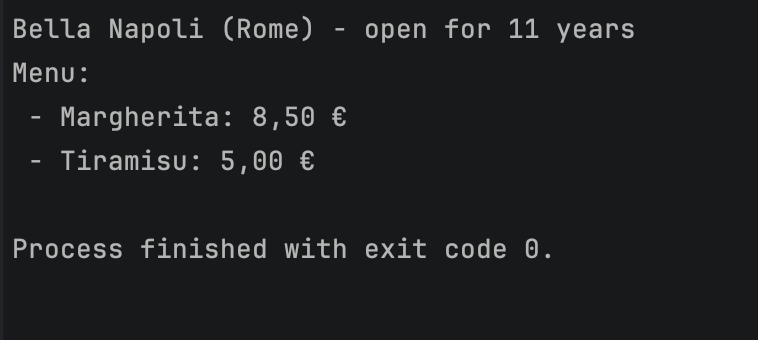
Let’s see it in action with a small console application. Since Mapperly doesn’t need any external dependency (no database, no HTTP pipeline), we can just instantiate our mapper directly:
using TestMapperly;

var restaurant = new Restaurant
{
    Id = 1,
    Name = "Bella Napoli",
    City = "Rome",
    OpeningDate = new DateTime(2015, 3, 10),
    MenuItems =
    [
        new MenuItem { Name = "Margherita", Price = 8.50m },
        new MenuItem { Name = "Tiramisu", Price = 5.00m }
    ]
};


var mapper = new RestaurantMapper();
var dto = mapper.ToDto(restaurant);

Console.WriteLine($"{dto.Name} ({dto.City}) - open for {dto.YearsOpen} years");
Console.WriteLine("Menu:");
foreach (var item in dto.MenuItems)
{
    Console.WriteLine($" - {item.Name}: {item.Price:C}");
}
A more complex example
The example above works well when our source and target classes are quite similar. But in real projects, we often need to map between classes that are structurally very different, maybe because the target is a flattened view, or because it combines data coming from multiple nested objects. Let’s see how Mapperly behaves in a scenario like this.
Let’s say our Restaurant entity is actually a bit richer, with a nested Owner and a nested Address, and an enum describing the type of cuisine:
public class Restaurant
{
    public int Id { get; set; }
    public string Name { get; set; } = string.Empty;
    public DateTime OpeningDate { get; set; }
    public CuisineType Cuisine { get; set; }
    public Owner Owner { get; set; } = new();
    public Address Address { get; set; } = new();
    public List<MenuItem> MenuItems { get; set; } = [];
}

public class Owner
{
    public string FirstName { get; set; } = string.Empty;
    public string LastName { get; set; } = string.Empty;
}

public class Address
{
    public string Street { get; set; } = string.Empty;
    public string City { get; set; } = string.Empty;
    public string Country { get; set; } = string.Empty;
}

public enum CuisineType
{
    Italian,
    Japanese,
    Mexican,
    Indian
}

public class MenuItem
{
    public string Name { get; set; } = string.Empty;
    public decimal Price { get; set; }
}
On the other side, we want a RestuarntSummaryDto that flattens the owner and the address into simple strings, turns the enum into a readable label, and exposes a computed IsNew flag instead of the raw opening date. As we can see, the two classes don’t look like at all anymore:
namespace TestMapperly;

public class RestaurantSummaryDto
{
    public int Id { get; set; }
    public string Name { get; set; } = string.Empty;
    public string OwnerFullName { get; set; } = string.Empty;
    public string FullAddress { get; set; } = string.Empty;
    public string Cuisine { get; set; } = string.Empty;
    public bool IsNew { get; set; }
    public int MenuItemsCount { get; set; }
}
Even with this level of difference, we don’t need to give up on Mapperly. We just need to give it a bit more guidance, mixing [MapProperty] attributes with a few custom mapping methods:
using Riok.Mapperly.Abstractions;
using TestMapperly;

[Mapper]
public partial class RestaurantMapper
{
    [MapProperty(nameof(Restaurant.Owner), nameof(RestaurantSummaryDto.OwnerFullName))]
    [MapProperty(nameof(Restaurant.Address), nameof(RestaurantSummaryDto.FullAddress))]
    [MapProperty(nameof(Restaurant.Cuisine), nameof(RestaurantSummaryDto.Cuisine))]
    [MapProperty(nameof(Restaurant.OpeningDate), nameof(RestaurantSummaryDto.IsNew))]
    [MapProperty(nameof(Restaurant.MenuItems), nameof(RestaurantSummaryDto.MenuItemsCount))]
    public partial RestaurantSummaryDto ToSummaryDto(Restaurant restaurant);

    // Combines two properties from the nested Owner object into a single string.
    private string MapOwnerFullName(Owner owner) => $"{owner.FirstName} {owner.LastName}";

    // Flattens the nested Address object into a single formatted string.
    private string MapFullAddress(Address address) => $"{address.Street}, {address.City} ({address.Country})";

    // Maps the enum to a friendlier label instead of relying on ToString().
    private string MapCuisine(CuisineType cuisine) => cuisine switch
    {
        CuisineType.Italian => "Italian Cuisine",
        CuisineType.Japanese => "Japanese Cuisine",
        CuisineType.Mexican => "Mexican Cuisine",
        CuisineType.Indian => "Indian Cuisine",
        _ => "Other"
    };

    // Turns a DateTime into a computed boolean.
    private bool MapIsNew(DateTime openingDate) => openingDate > DateTime.UtcNow.AddYears(-1);

    // Turns a list into its count, instead of mapping the items themselves.
    private int MapMenuItemsCount(List<MenuItem> menuItems) => menuItems.Count;
}
What we like about this approach is that, even when the shapes of our classes diverge significantly, we are still writing plain, explicit C# methods. There is no hidden configuration to remember and no profile to keep in sync; the mapping logic lives right next to the mapper itself, and it’s fully covered by the compiler and by IntelliSense.
If we only need to ignore a property instead of mapping it to something else, we can also use the [MapperIgnoreTarget] attribute directly on the mapping method, which is a handy shortcut when our target class has a few extra properties we don’t want to populate:
[MapperIgnoreTarget(nameof(RestaurantSummaryDto.MenuItemsCount))]
public partial RestaurantSummaryDto ToSummaryDtoWithoutCount(Restaurant restaurant);
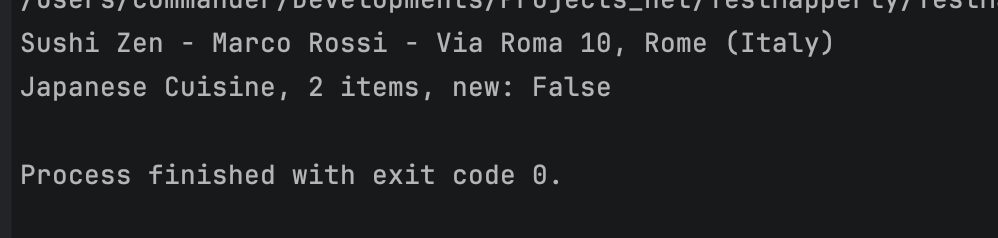
Let’s test this one too, in the same console application. Since ToDto and ToSummaryDto live in the same RestaurantMapper partial class, we can reuse the same mapper instance we already created:
using TestMapperly;

var restaurantWithDetails = new Restaurant
{
    Id = 2,
    Name = "Sushi Zen",
    OpeningDate = new DateTime(2023, 5, 1),
    Cuisine = CuisineType.Japanese,
    Owner = new Owner { FirstName = "Marco", LastName = "Rossi" },
    Address = new Address { Street = "Via Roma 10", City = "Rome", Country = "Italy" },
    MenuItems =
    [
        new MenuItem { Name = "Salmon Nigiri", Price = 9.00m },
        new MenuItem { Name = "Miso Soup", Price = 4.00m }
    ]
};

var mapper = new RestaurantMapper();
var summaryDto = mapper.ToSummaryDto(restaurantWithDetails);

Console.WriteLine($"{summaryDto.Name} - {summaryDto.OwnerFullName} - {summaryDto.FullAddress}");
Console.WriteLine($"{summaryDto.Cuisine}, {summaryDto.MenuItemsCount} items, new: {summaryDto.IsNew}");
Mapperly gives us a free, fast, and transparent way to handle object mapping in our .NET applications. Since it generates plain C# code at compile time, we get better performance than reflection-based mappers, along with compile-time safety and a mapper we can actually read and debug.